TEG Operations Dashboard
Analytics, AI Lead Qualification & Document Automation Platform
- Python
- Streamlit
- Flask
- OpenAI
- SQLite
A production-deployed, multi-page operations platform built for The Evans Group (TEG), a high-end luxury and couture fashion manufacturer. It unifies data from Monday.com, Calendly, and Google Ads into a single analytics hub, scores inbound leads with an OpenAI-powered qualification API, and automates the company's most repetitive paperwork: contracts, client decks, and pricing workbooks.
Role: Full-stack / data developer who designed the SQLite caching layer, built every Streamlit dashboard, the Flask AI lead-qualifier service, the document-generation pipelines (SignNow, Google Slides, Excel→PDF), the scheduled data-sync jobs, and the server deployment.
Table of Contents
- The Problem
- What the Application Does
- Tech Stack
- Architecture Overview
- Core Features
- The AI Lead Qualifier
- Document Automation Pipelines
- Data Layer & Sync Strategy
- Notable Engineering Challenges & Solutions
- DevOps & Deployment
- Project Stats
- Possible Future Improvements
The Problem
TEG runs a sales-and-marketing operation whose data and busywork were scattered across half a dozen disconnected tools, each solving one slice of the workflow and none talking to the others:
- Fragmented operational data: Lead, sales, and pipeline data lived in Monday.com boards; call bookings lived in Calendly; ad spend lived in Google Ads. Nobody could see, in one place, how marketing spend turned into leads, calls, and closed revenue.
- No marketing attribution: There was no straightforward way to tie Google Ad spend to actual sales, i.e. to calculate ROAS (Return on Ad Spend).
- Slow, inconsistent lead triage: Inbound inquiries from the website's fashion-manufacturing form had to be read and judged by hand. TEG only serves luxury, small-to-medium-volume production (1 to 300 pieces per style), so a large share of leads are spam or simply a bad fit, and were still consuming sales-team time.
- Manual document production: Every client engagement required hand-built legal contracts, PowerPoint pitch decks, and detailed Excel pricing workbooks. These were copied, edited, and re-formatted by hand for each client.
- Sluggish, rate-limited APIs: Querying Monday.com and Calendly live on every page load was slow and risked hitting API rate limits during a working day.
This platform replaces that scattered tooling with one role-appropriate internal site: dashboards for management, an automated qualifier for inbound leads, and a tools hub that generates client documents in minutes instead of hours.
What the Application Does
In one sentence: it ingests TEG's CRM, calendar, and ad data into a fast local cache, visualizes it across purpose-built dashboards, automatically scores and routes every inbound lead with AI, and generates the company's client-facing documents on demand.
- Syncs Monday.com boards and Calendly events into local SQLite databases on a schedule, so dashboards are fast and resilient to API hiccups.
- Presents a multi-page Streamlit site covering ads/ROAS, sales KPIs, lead flow, and call analytics.
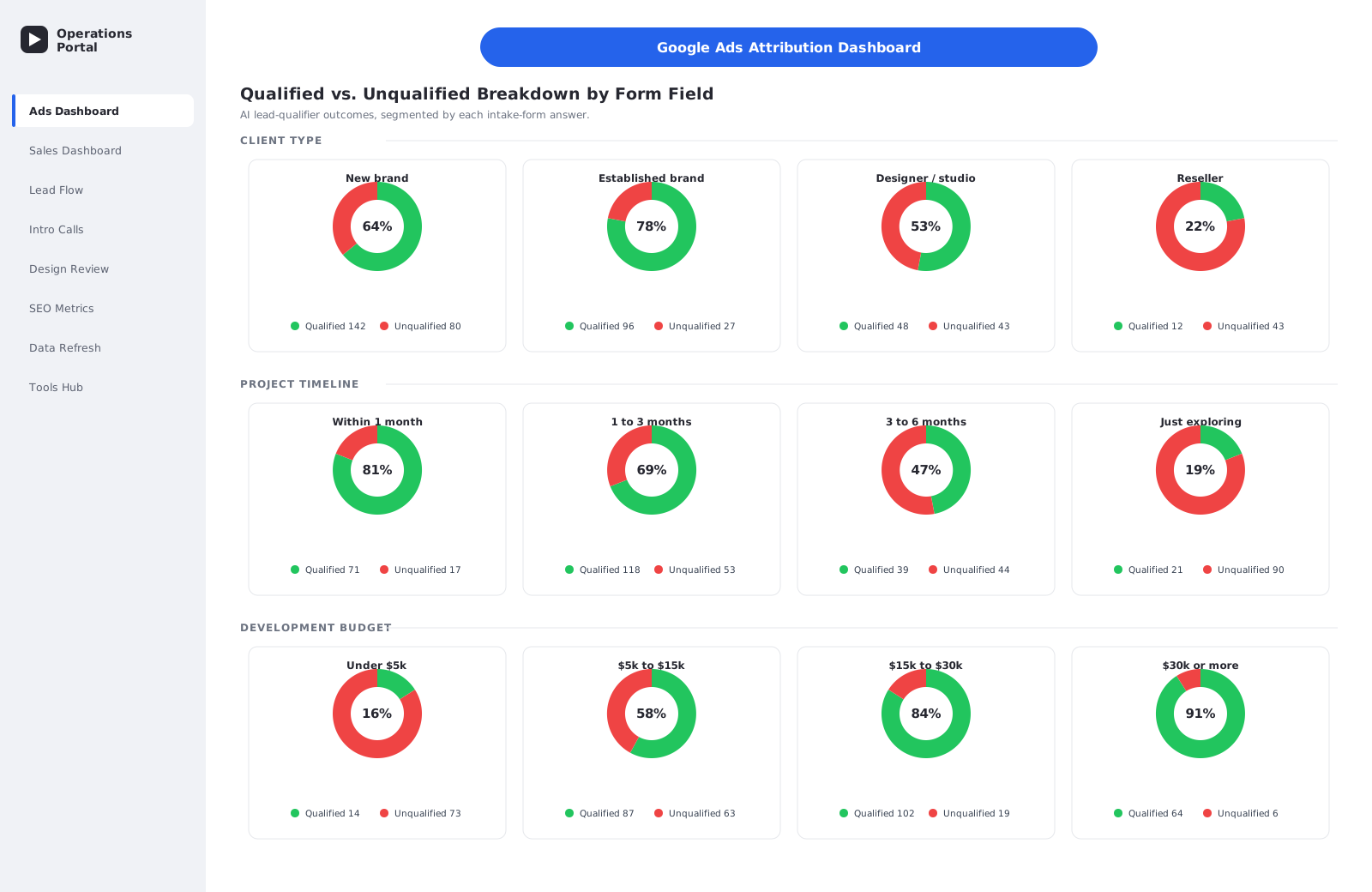
- Runs a Flask + OpenAI API that scores each website lead 0 to 3, applies business rules, logs the decision, and redirects the lead to the right Calendly booking page for their fit level.
- Generates and e-mails legal contracts for signature via SignNow.
- Builds branded PowerPoint decks from category templates using image assets pulled from Google Drive.
- Builds detailed Excel pricing workbooks for development packages and exports them to PDF through the Google Sheets API.
- Keeps itself running with cron jobs, tmux sessions, and an auto-restart watchdog behind an Nginx reverse proxy.
Tech Stack
| Layer | Technology |
|---|---|
| Language | Python 3.12 |
| Dashboards | Streamlit (multi-page app) |
| AI service | Flask REST API + OpenAI gpt-4o-mini (JSON-mode structured output) |
| Data & viz | pandas, NumPy, Plotly (interactive charts) |
| Local cache | SQLite (monday_data.db, calendly_data.db) |
| External APIs | Monday.com GraphQL API, Calendly API, Google Ads (via Monday board), SignNow API, Google Drive / Sheets / Slides API |
| Document generation | python-docx, python-pptx, openpyxl, reportlab, PyMuPDF, PyPDF2 |
| Auth to Google | Google service-account credentials |
| Server | Ubuntu droplet, Nginx reverse proxy, Let's Encrypt SSL, tmux, cron |
Why these choices: Streamlit turns data-heavy Python into an interactive web UI with almost no frontend code, ideal for an internal analytics tool. A separate Flask service isolates the public, OpenAI-backed lead qualifier from the internal dashboards, so a spike in form traffic cannot slow down management reporting. A SQLite cache decouples the UI from slow third-party APIs entirely. The document libraries (python-docx, python-pptx, openpyxl) make it possible to populate real, brand-accurate templates rather than generating documents from scratch.
Architecture Overview
The system is three cooperating processes plus a scheduled sync job, all sharing the same SQLite cache:
TEG_Monday_Dashboard/
├── ads_dashboard.py            # Streamlit entry point: Ads / ROAS dashboard
├── database_utils.py           # Shared SQLite read layer (board → items adapter)
├── refresh_database.py         # Standalone cron sync: Monday + Calendly → SQLite
├── lead_qualifier_api.py       # Flask + OpenAI lead-scoring microservice
│
├── pages/                      # Streamlit sub-pages (auto-discovered)
│   ├── sales_dashboard.py      # Revenue KPIs: YTD/MTD, by salesman & category
│   ├── new_leads_check.py      # Lead-flow monitoring (calendar/daily/weekly)
│   ├── intro_call_dashboard.py # Calendly intro-call analytics
│   ├── burki_dashboard.py      # Single-rep call dashboard
│   ├── design_review_dashboard.py # Design-review meeting analytics
│   ├── seo_metrics.py          # Embedded Looker Studio SEO report
│   ├── database_refresh.py     # In-app data-sync control panel
│   ├── tools.py                # Employee tools hub (navigation)
│   ├── signnow_form.py         # Contract generation & sending
│   ├── deck_creator.py         # PowerPoint deck generator
│   ├── workbook_creator.py     # Excel development-package workbook generator
│   └── a_la_carte.py           # Custom / a-la-carte workbook variant
│
├── signnow_integration.py      # SignNow API client
├── docx_template_processor.py  # Word-template fill / merge engine
├── google_sheets_uploader.py   # Google Sheets/Drive upload + PDF export
├── scripts/                    # Batch & debugging utilities
├── inputs/                     # Deck/workbook/contract templates & assets
└── .streamlit/secrets.toml     # API credentials (gitignored)
Key design decisions
- API data is cached, never read live. Dashboards read exclusively from SQLite via
database_utils.py. A scheduled job (refresh_database.py) is the only code that talks to Monday/Calendly for sync. This makes the UI fast and keeps it working even when an upstream API is down. - An adapter keeps the cache API-shaped.
get_board_data_as_items()rehydrates each cached row back into the exact nested{id, name, column_values}shape Monday.com returns, so dashboard code is written once and works against either source. - The lead qualifier is its own service. Running on its own port as a Flask app, it can be scaled, secured, and deployed independently of the Streamlit site, and serves a public endpoint without exposing internal dashboards.
- Documents are generated from real templates. Decks, workbooks, and contracts are produced by populating TEG's existing branded
.pptx/.xlsx/.docxfiles, so output is always on-brand.
Core Features
1. Ads / ROAS Dashboard (entry point)
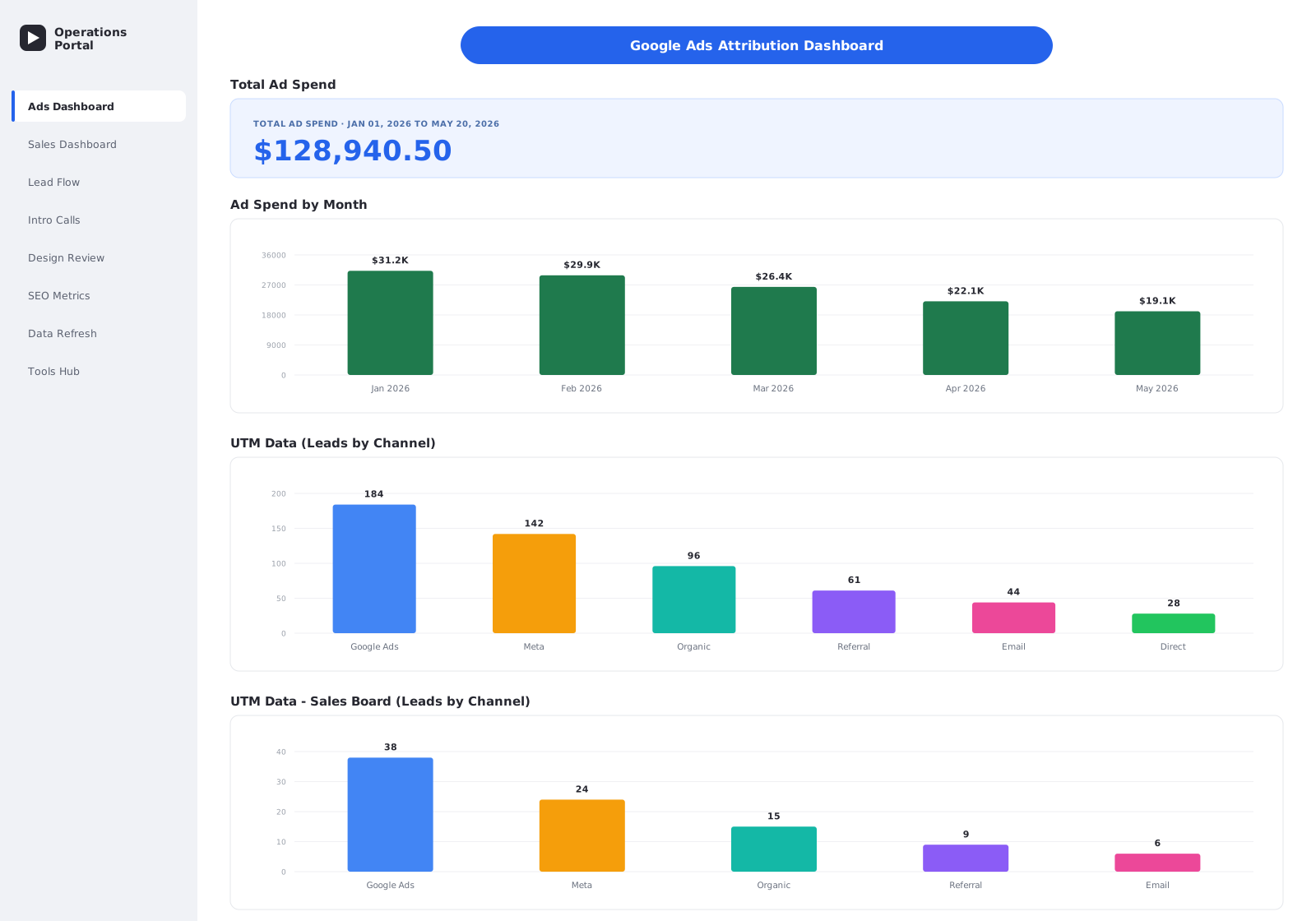
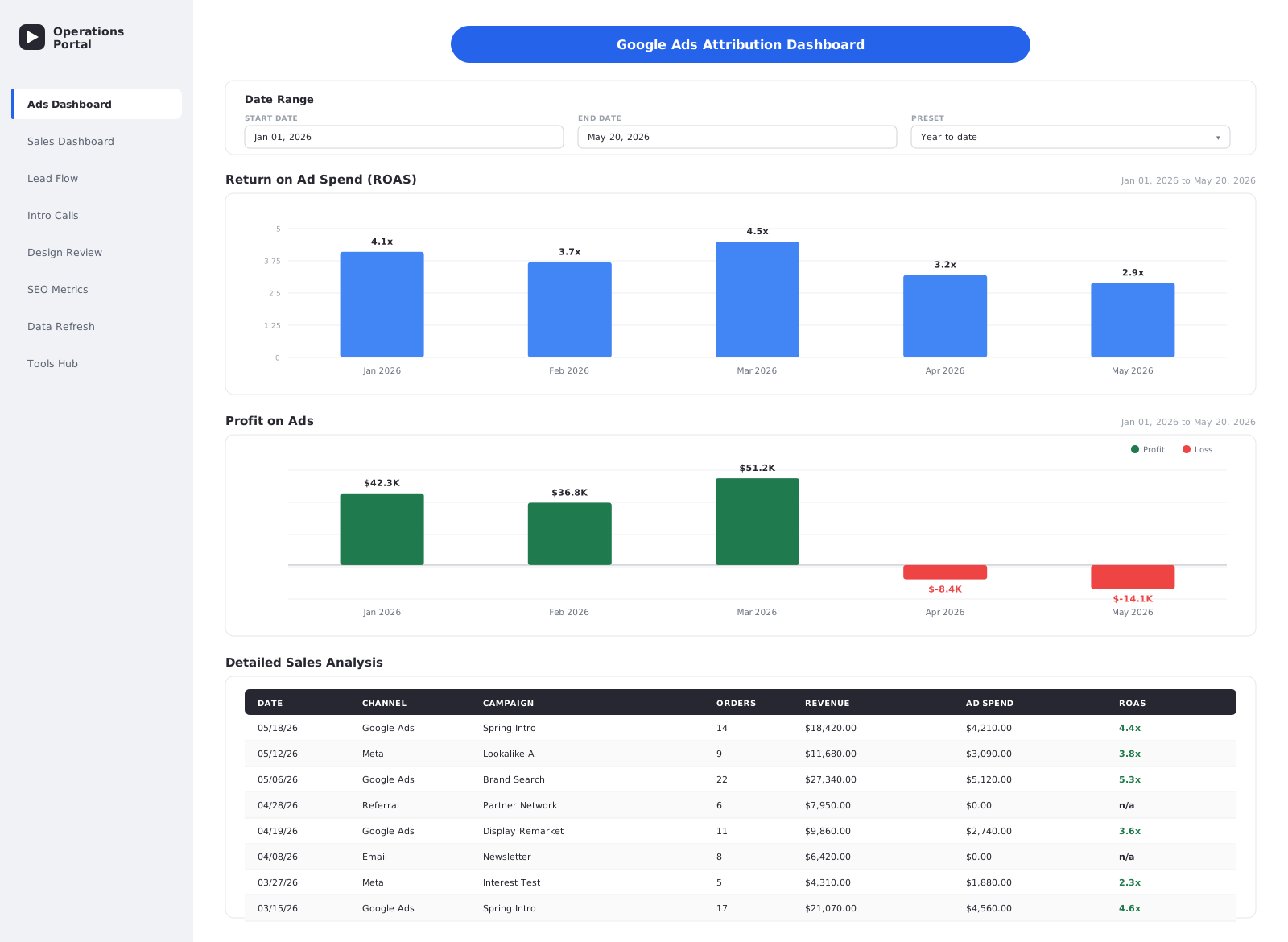
The landing page focuses on marketing attribution: Google Ad spend and campaign performance pulled from a Monday board, joined against sales data to compute Return on Ad Spend. Interactive Plotly charts visualize spend, leads, and conversion over time.
2. Sales Dashboard
A management view of sales performance: Year-to-Date and Month-to-Date revenue, breakdowns by salesperson, revenue category, and time period, with interactive filters and CSV export.
3. Lead-Flow & Pipeline Monitoring
The New Leads Check page tracks inbound leads from "New Lead" through to "Closed" with calendar, daily, and weekly views. Pipeline logic filters out spam/rejected items and counts only qualified leads, using per-board qualification-status columns.
4. Call Analytics (Calendly)
Three focused dashboards analyze Calendly bookings:
- Intro Call Dashboard: volume and source breakdown for introductory calls.
- Design Review Dashboard: analytics for design-review meetings, timezone-corrected to California time.
- Burki Dashboard: a single-rep dashboard isolating one team member's calls.
Calendly events are filtered by booking-URL pattern, so each dashboard reliably picks up only its own event type.
5. SEO Metrics
Embeds an external Looker Studio report and supporting Google Sheets so SEO performance lives alongside the rest of the operational data.
6. Database Refresh Control Panel
An in-app page that lets non-technical staff trigger a Monday/Calendly resync on demand, with progress feedback and retry logic: the same logic the cron job runs, exposed as a button.
7. Employee Tools Hub
A separate Streamlit instance (with a curated sidebar) that gives staff one-click access to the three document-automation tools below.
The AI Lead Qualifier
The most domain-specific component: a Flask microservice that turns the website's lead form into a self-sorting funnel.
How it works
- The website form submits lead details (name, email, phone, project description) to a
GET /qualifyendpoint. - The service prompts OpenAI
gpt-4o-miniin JSON mode with a carefully engineered classification prompt encoding TEG's business model (luxury, couture, 1 to 300 pieces/style). - The model returns a structured score from 0 to 3 with a confidence level and reasoning:
- 0: Spam · 1: Not the right fit · 2: Unsure · 3: Right fit
- A deterministic business-rules layer (
apply_business_weighting) then adjusts the AI score using budget and style-count signals the model is told not to consider, e.g. cap a "3" to "2" if budget is under $5k or fewer than 5 styles, or lift a "2" to "3" for a $10k to $20k budget. The rules are intentionally one-directional (they never promote a clear "not a fit"). - The lead is redirected to the Calendly page that matches their score: a "thank-you" page for spam/poor fit, a lighter "let's chat" booking for unsure leads, and the full introductory-call booking (with name, email, and project pre-filled) for strong leads.
- Every decision is appended to a CSV audit log with the inputs, score, confidence, and reason.
Why this design: separating the AI judgment (subjective fit, from the project narrative) from hard business rules (budget/volume thresholds) makes the system both explainable and tunable: TEG can adjust the thresholds without touching the prompt, and the prompt without re-deriving the rules. A batch variant (scripts/batch_qualify_from_excel.py) re-scores historical leads in bulk for analysis and tuning.
Document Automation Pipelines
Three tools in the Employee Hub eliminate hours of manual copy-paste per client:
Contract Generation: SignNow
signnow_form.py + signnow_integration.py + docx_template_processor.py together:
- Fill TEG's Development and Production Word contract templates with client- and project-specific terms.
- Merge multi-part documents (contract + terms & conditions) into one.
- Upload to SignNow and dispatch for electronic signature, with signature-image assets embedded.
Deck Creator: PowerPoint
deck_creator.py builds branded pitch decks from category-specific .pptx templates (Activewear, Bridal & Couture, Loungewear, Contemporary, Streetwear, etc.). It assembles service columns and priority slides and pulls image assets from Google Drive, producing a client-ready deck without manual slide editing.
Workbook Creator: Excel to PDF
workbook_creator.py and a_la_carte.py populate TEG's 2025 Workbook Template with development-package line items and pricing, preserving every formula and cell style via openpyxl deep-copy. The finished workbook is uploaded through google_sheets_uploader.py and exported to PDF via the Google Sheets API. The A La Carte variant supports flexible, custom-priced item sets.
Data Layer & Sync Strategy
refresh_database.pyis a standalone, cron-driven script that pulls every Monday.com board and all Calendly events and writes them into two SQLite files (monday_data.db,calendly_data.db). It includes retry logic for API stability.database_utils.pyis the shared read layer. It exposes typed accessors (get_sales_data,get_ads_data,get_new_leads_data, …) and an API-compatibility adapter that parses cachedcolumn_valuesJSON back into Monday's native nested structure, robustly falling back fromjson.loadstoast.literal_evalfor legacy rows.- Streamlit caching (
ttl≈300s) layers a second, in-process cache on top for instant repeat renders. - Health helpers (
check_database_exists,get_database_info) let dashboards detect a missing or empty cache and tell the user to run a refresh instead of rendering a blank page.
This three-tier design (scheduled sync → SQLite → Streamlit cache) is what lets a data-heavy, multi-board CRM dashboard feel instant.
Notable Engineering Challenges & Solutions
1. Slow, rate-limited third-party APIs
Challenge: querying Monday.com and Calendly on every page load was slow and risked rate limits.
Solution: a scheduled sync job mirrors all external data into SQLite; dashboards read only the local cache, so the UI is fast and survives upstream outages.
2. Keeping cached data shaped like the live API
Challenge: dashboards were originally written against Monday's nested GraphQL response; rewriting them for a flat SQL schema would have been a huge change surface.
Solution: an adapter (get_board_data_as_items) rehydrates each cached row into the exact {id, name, column_values} structure the API returns, so dashboard code never knows it's reading a cache.
3. Explainable, tunable lead scoring
Challenge: a pure-LLM score is hard to trust and hard to adjust; pure rules cannot read a free-text project description.
Solution: a hybrid approach. The LLM judges fit from the narrative, then a deterministic, one-directional rules layer adjusts for budget/volume. Every decision is logged with its reasoning for audit and tuning.
4. Generating on-brand documents, not generic ones
Challenge: clients expect TEG's exact branding, formulas, and legal wording.
Solution: every output is built by populating TEG's real .pptx / .xlsx / .docx templates. That means deep-copying Excel cell styles and formulas, merging Word documents, and embedding signature images, so generated files are indistinguishable from hand-made ones.
5. Correct call analytics across timezones
Challenge: Calendly stores event times in UTC; TEG staff think in California time, and naïve conversion shifted calls onto the wrong day.
Solution: explicit pytz localization to America/Los_Angeles before any date bucketing, so daily/weekly call counts are always right.
6. Reliably separating overlapping Calendly event types
Challenge: intro calls, design reviews, and per-rep calls all live in one Calendly account.
Solution: each dashboard filters events by booking-URL pattern rather than fragile title matching, so every dashboard sees exactly its own event type.
DevOps & Deployment
The platform runs on an Ubuntu droplet, served at a public domain over HTTPS:
- Three long-running processes managed in
tmuxsessions (the main dashboard, the employee tools hub, and the lead-qualifier API), each on its own port. - Nginx reverse proxy routes paths (
/ads-dashboard/,/tools/,/qualify) to the right process, with WebSocket upgrades enabled for Streamlit's live interactivity. - Let's Encrypt SSL (Certbot) with automatic HTTP→HTTPS redirect.
- Cron jobs: a data refresh every 30 minutes, and a watchdog every 5 minutes.
- Auto-restart watchdog (
check_tmux.sh): checks each tmux session and restarts any process that has crashed, logging every recovery. - A
PRODUCTION_IMPROVEMENTS.txtdocument captures a prioritized production-hardening roadmap (secrets management, atomic refresh, alerting, log rotation), reflecting real operational ownership of the system.
Project Stats
- ~24,000+ lines of application Python across dashboards, services, and tooling.
- 12 Streamlit pages + a separate Flask microservice.
- 3 external data sources (Monday.com, Calendly, Google Ads) cached into 2 SQLite databases.
- 3 document-automation pipelines (SignNow contracts, PowerPoint decks, Excel→PDF workbooks).
- 6+ third-party API integrations: Monday.com, Calendly, OpenAI, SignNow, Google Drive/Sheets/Slides.
- Production-deployed behind Nginx + SSL with cron-driven sync and an auto-restart watchdog.
Possible Future Improvements
- Move secrets from
secrets.tomlto environment variables or a secrets manager. - Make the database refresh atomic (staging table / transaction swap) so a mid-sync crash cannot empty a dashboard.
- Unify the duplicated refresh logic in
refresh_database.pyandpages/database_refresh.pyinto one shared module. - Add rate limiting and input validation to the public lead-qualifier endpoint.
- Add alerting when a scheduled refresh fails, plus structured logging with rotation.
- Replace hardcoded Monday.com column IDs with a title-based config map to survive board changes.
- Migrate process management from
tmux+ cron watchdog tosystemdservices.
Built with Python · Streamlit · Flask · OpenAI · pandas · SQLite, integrating Monday.com, Calendly, SignNow, and the Google Workspace APIs, deployed on an Nginx + SSL server.